Range operations software
Run the range.
Not the software.
Booking, digital waivers, the live floor, memberships and rentals, in one system your front desk can actually run. Set it up this afternoon, take bookings tonight, and stop paying POS-suite money for a scheduling calendar.
14 days free · Cancel before you are charged · No implementation fee
- 0%
- Taken from your bookings
- 1
- Login for the whole range
- 14 days
- Free, on your own lanes
- 4 hrs
- Typical time to go live
Everything Rangune takes off the counter
01The floor
One screen
runs the day.
Every lane, every party, every outstanding waiver, on one board. Your rangemaster can see which lanes are free and for how long, which ones are waiting on a signature, and which are out of service, without clicking into a single detail view.
-
Status you can read across the room
Idle, awaiting waivers, checked in, out of service. The state is the first thing on the card and the lane’s edge carries the colour.
-
Waiver progress on the lane itself
A lane that cannot go hot says so: “0/1 waivers”, “check in · waiting on waivers”. Chase the one person holding it up, not the whole party.
-
Book and check in from the card
Walk a party straight onto an idle lane, check them in, or open the reservation, without leaving the board.
-
Free time, stated in minutes
“Free until 3:30 PM · 149 min.” The answer a walk-up needs, without anyone doing arithmetic.
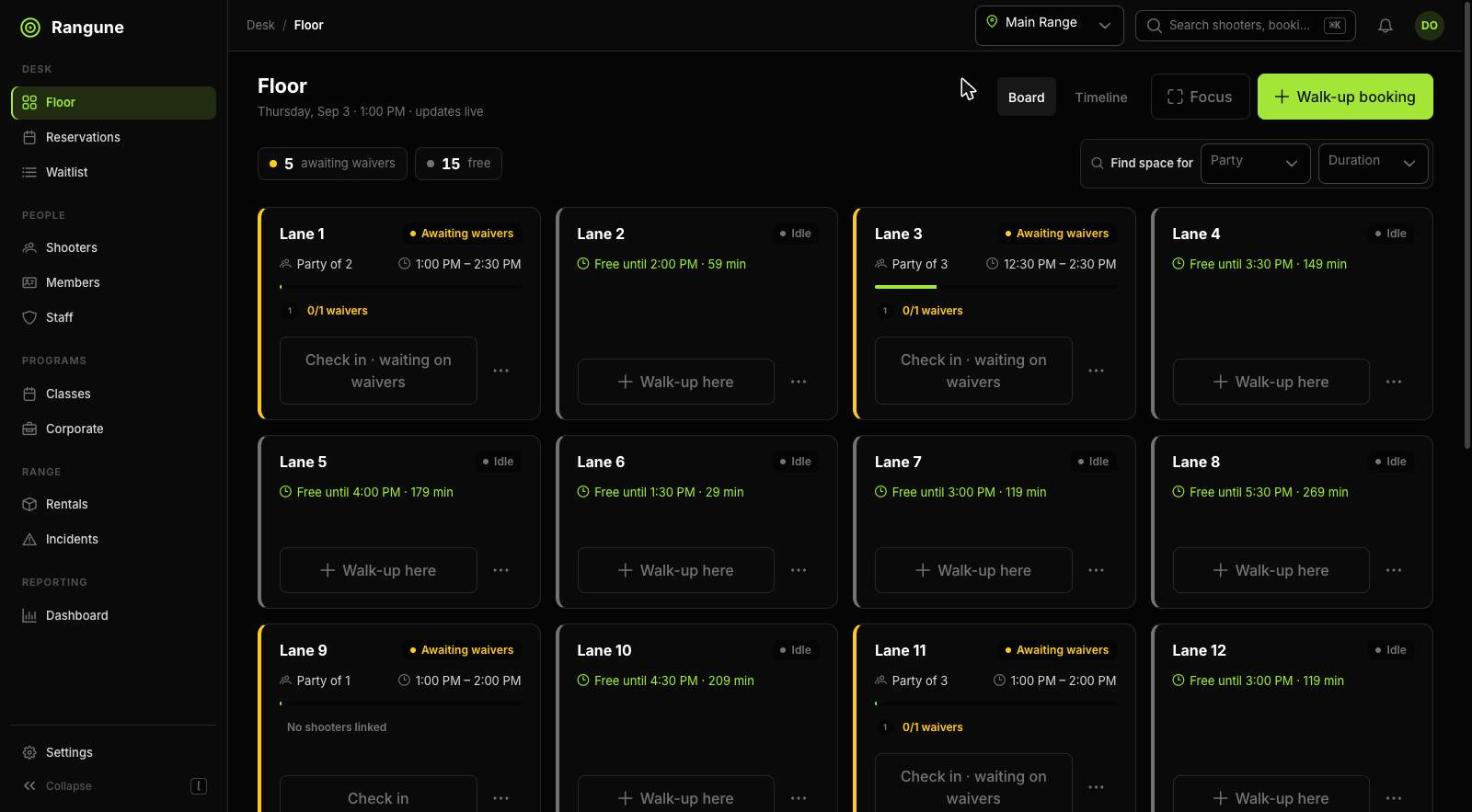
Screenshot from the live product, not a mockup
02The system
Six things a range
needs to run. All six.
Not a booking calendar with waivers bolted on, and not a retail POS with a scheduling tab. Every part below was built against the same lane, the same shooter, and the same rule set, so nothing has to be kept in sync by hand.
Booking
A four-step flow (party, caliber, lane, time) that fills on the storefront and at the counter using the exact same availability engine.
DetailWaivers
One signature per shooter per visit, guardian details enforced for minors, and an audit export your insurer will actually accept.
DetailFloor
The live board: status, timers, waiver progress, one-tap check-in and checkout. Built for a busy counter, not a quiet office.
DetailMemberships
Tiers, recurring billing, member pricing and included lane hours, enforced automatically at booking, not remembered by staff.
DetailRentals
Check a firearm out to a named shooter, back in at the end, with a chain of custody you can produce months later.
DetailReporting
Revenue, utilisation, no-shows and peak hours per lane, per location, per range officer. Exportable, not trapped in a dashboard.
Detail03Where customers book
Two front doors.
One set of lanes.
Whether a booking comes from your own page, your BigCommerce store, or the person standing at your counter, it hits the same availability engine and the same rules. There is no second calendar to reconcile.
Your own booking page
A hosted, branded booking page on your own subdomain, with Stripe Connect underneath. You onboard your Stripe account, you are the merchant of record, and the money goes from your customer to your bank. We never touch your funds and we never take a cut of a booking.
- Live in an afternoon, no storefront required
- Your logo, your colours, your subdomain
- Apple Pay, Google Pay and cards via Stripe
- Deposits, full prepay or pay-at-counter
Inside your BigCommerce store
Already selling ammo and gear on BigCommerce? The Rangune app drops a booking modal straight onto the product page, so a customer adds two hours of lane time to the same cart as a box of 9mm and checks out once.
- Booking modal on the product page, no redirect
- Lane time, rentals and classes in the same cart
- Guest checkout, no store account required
- Waivers issued automatically after the order
04Getting started
From signup to
first booking.
No sales cycle, no implementation team, no five-figure onboarding invoice. This is the whole process.
-
01
Create your range
Name, timezone, hours. Two minutes. You are inside the admin before you have decided on a plan.
-
02
Add lanes and rules
Pistol lanes, rifle bays, party sizes, age minimums, caliber limits, off-peak pricing. All of it is data you edit yourself.
-
03
Connect Stripe
Stripe Connect onboarding in a new tab. Your account, your payouts, your name on the statement.
-
04
Send the link
Put your booking page on your site and your Instagram bio. The first reservation lands on the floor board the moment it is paid.
05The alternatives
Why ranges leave the
software they have.
There are two kinds of product in this market: a full firearms POS suite with range booking bolted to the side, and a generic facility booking tool that has never heard of a waiver. Both leave you running the range out of a second system.
| Rangune | Firearms POS suites | Generic booking tools | |
|---|---|---|---|
| Typical monthly cost | $99 – $399 | $1,200 – $2,500+ | $39 – $400 |
| Time to go live | An afternoon | Weeks of implementation | Days |
| Onboarding fee | None | Four to five figures | Sometimes |
| Lane rules you can edit yourself | Yes | Support ticket | Generic resources only |
| Waivers built in | |||
| Live floor view | Varies | ||
| Rental chain of custody | |||
| Percentage of your bookings | 0% | Varies | Often per-booking |
| Replaces your POS | No, by design | Yes, whether you want it or not | No |
Comparison reflects publicly listed pricing and published feature sets as of September 2026.
06Pricing
Priced by lanes.
Not by sales call.
Starter
$99 / mo
One location, up to 8 lanes.
- Hosted booking page with Stripe checkout
- Digital waivers: QR and lobby kiosk
- Lane calendar and walk-up booking
- Lane rules: party size, age, caliber
Growth
$199 / mo
One location, unlimited lanes.
- Everything in Starter
- Live floor view with lane status
- Membership tiers and recurring billing
- Rental firearm check-out and return
Pro
$399 / mo
Unlimited locations, unlimited lanes.
- Everything in Growth
- Multi-location rollup dashboard
- Rental chain of custody and audit export
- Rangemaster sign-off and incident log
Your lanes are bookable
by the end of the day.
Fourteen days on your own lanes, your own hours, your own rules. Cancel any time in those two weeks and you pay nothing — no demo gatekeeping, no implementation call to sit through first.